No monthly fees  ·  Self-hosted  ·  Works offline

Specialized POS Systems for Restaurants & Service Businesses

IntuitiveTill offers two purpose-built, self-hosted point-of-sale systems — one crafted specifically for restaurants and cafés, and one built for service and job-based businesses. Full-featured. No cloud. No monthly fees.

🍽️ Restaurant POS | 🛠️ Service & Job POS | Compare →
2
Specialized systems
$0
Monthly fees
100%
Your data
IntuitiveTill — Restaurant Point of Sale
All Food Drinks Desserts Specials
Cheeseburger
$12.99
Caesar Salad
$9.50
Club Sandwich
$11.00
Lemonade
$3.50
Fries (lg)
$4.00
Soup of Day
86'd
Current Order
Dine In Takeout
Cheeseburger $12.99
Lemonade $3.50
Fries (lg) $4.00
Subtotal$20.49
Tax 8%$1.64
Total$22.13

↑ Live preview of the IntuitiveTill Restaurant POS interface

Everything you need

Built for How Restaurants
Actually Operate

Every module was designed with real restaurant workflow in mind — not retrofitted from a generic retail system.

🖥️

Full Point of Sale

Category menu with search, dine-in / takeout / delivery order types, table assignments, customer details, and order notes. Send to kitchen in one tap.

  • Menu grid with category filters
  • Dine-in, takeout & delivery
  • Void items with stock reversal
  • Print receipts on any printer
👨‍🍳

Kitchen Display System

Real-time order display for the kitchen — no paper tickets. Orders auto-refresh every 8 seconds with age timers that turn amber at 5 min and red at 10 min.

  • Live auto-refresh (8 sec)
  • Age warnings — amber & red alerts
  • Start cooking → Mark ready flow
  • Shows mods, omissions & add-ons
📦

Inventory & Recipe BOM

Link every menu item to a bill-of-materials recipe. Stock deducts automatically on every sale. Know your actual vs expected cost down to the dollar.

  • Ingredient CRUD + reorder points
  • BOM recipes per menu item
  • Variance / shrinkage report
  • Dollar-impact loss analysis
📊

Manager Dashboard

Today's sales, order count, average order value, labor cost, and prime cost % — all at a glance. Sales breakdown by dine-in, takeout, and delivery.

  • Real-time sales & AOV
  • Prime cost % (food + labor)
  • Sales by order type
  • Low stock alerts
⏱️

Employee Timesheets

Staff clock in and out from any device on your network. Managers get a weekly payroll report with hours, rates, and totals — exportable to CSV.

  • PIN-based clock in / out
  • Weekly payroll summary
  • CSV export for payroll
  • Per-employee detail view
📊

QuickBooks Export

Export sales, inventory, and labor data as CSV files ready to import directly into QuickBooks Desktop or Online — no manual data entry required.

  • Sales export by date range
  • Inventory valuation export
  • Labor & payroll export
  • One-click CSV download
💳

Flexible Payments

Accept cash with automatic change calculation, or connect Square for full card processing — tap, chip, and swipe. Gift cards and house accounts supported.

  • Cash with change calculator
  • Square card processing
  • Gift cards & house accounts
  • Configurable tax rate

Everything you need

Built for How Service & Job Businesses
Actually Operate

Every module was designed around the real workflow of service and job-based businesses — from writing a quote to closing an invoice and reconciling the books.

🖥️

Point of Sale & Checkout

Quick item and service lookup, customer linking, and counter or field-service order types. Built for speed at the counter and flexibility in the field.

  • Item & service lookup with filters
  • Link orders to customer records
  • Counter, field service & pickup types
  • Print receipts on any printer
📋

Job Pipeline

Move every job through a structured pipeline — Quote → Approved → In Progress → Invoiced. See all active jobs at a glance on a visual status board.

  • Quote → Approved → In Progress → Invoiced
  • Visual job status board
  • Assign jobs to technicians
  • Track estimated vs. actual time
👥

Customer CRM

Every customer gets a full profile — contact info, complete job history, notes, and communication log. Know your customers before you call them back.

  • Full contact info & job history
  • Notes & communication log
  • Attach documents to customer records
  • Repeat customer detection
📈

Manager Dashboard

Revenue by job status, labor cost vs. revenue ratio, top services by sales, and overdue invoice alerts — everything a manager needs without pulling reports.

  • Revenue by job status
  • Labor cost vs. revenue ratio
  • Top services & products by sales
  • Overdue invoice & open job alerts
⏱️

Employee Timesheets

Techs and staff clock in and out from any device on your network. Weekly payroll reports with hours, rates, and totals — exportable to CSV.

  • PIN-based clock in / out
  • Weekly schedule management
  • Weekly payroll summary
  • CSV export for payroll
📦

Inventory & Parts Tracking

Track parts and materials with reorder alerts. Link parts to jobs via a bill-of-materials. Know your actual vs. expected cost and see exactly where stock is going.

  • Parts & materials CRUD + reorder points
  • Link parts to jobs via bill-of-materials
  • Variance / shrinkage report
  • Dollar-impact loss analysis
💼

QuickBooks Export

Export sales, inventory, and labor data as CSV files ready to import directly into QuickBooks Desktop or Online — no manual data entry required.

  • Sales & invoice export by date range
  • Inventory valuation export
  • Labor & payroll export
  • One-click CSV download

Seamless workflow

From Table to Closed Check

IntuitiveTill connects every station in your restaurant — front-of-house, kitchen, and manager — in one smooth loop.

📋
1

Take the Order

Cashier selects menu items from the grid, sets the order type (dine-in, takeout, or delivery), and hits Place Order. Takes under 30 seconds.

🍳
2

Kitchen Gets It Instantly

The order appears on the Kitchen Display System immediately. Staff tap Start Cooking, then Mark Ready — no paper tickets, no shouting.

💰
3

Close & Pay

When ready, tap Review & Pay to collect cash or run a card through Square. Inventory auto-deducts, the check closes, and it rolls into manager reports.

🧑‍💼
Manager
Full access — POS, KDS, Inventory, Dashboard, Timesheets, Admin
💁
Cashier
POS + Timesheet — takes orders and clocks in/out
👨‍🍳
Kitchen Staff
KDS + Timesheet — cooks manage their own queue

See it in action

Every Screen, Built for Speed

Clean, dark UI designed for real working conditions — easy to read, fast to tap on any touchscreen or tablet. Both systems share the same proven interface.
🍽️

Restaurant & Café POS

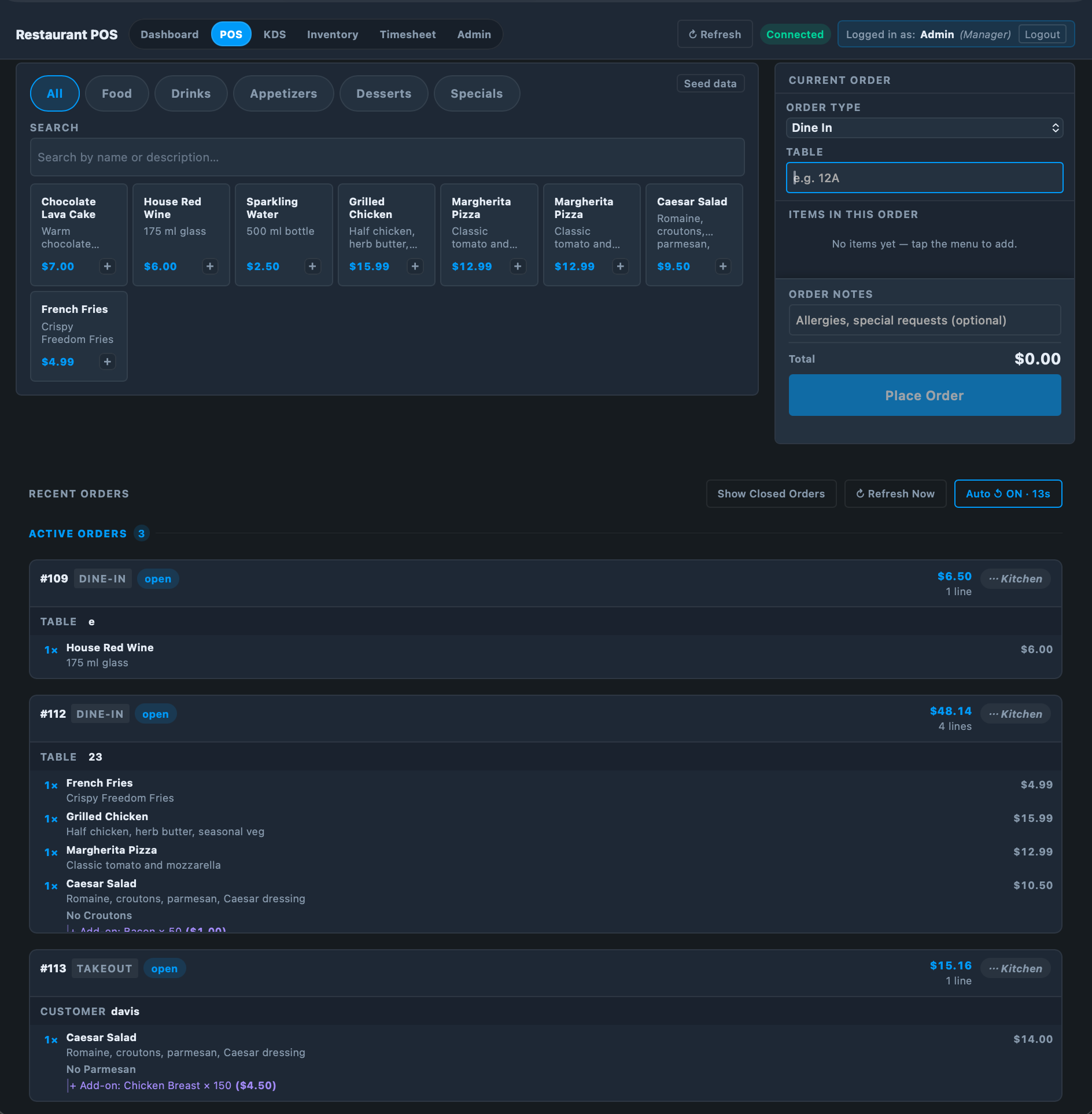
POS — Full Overview
IntuitiveTill POS full overview

POS Main Screen

Category filters, menu grid, live cart, and order type selector in one clean layout.
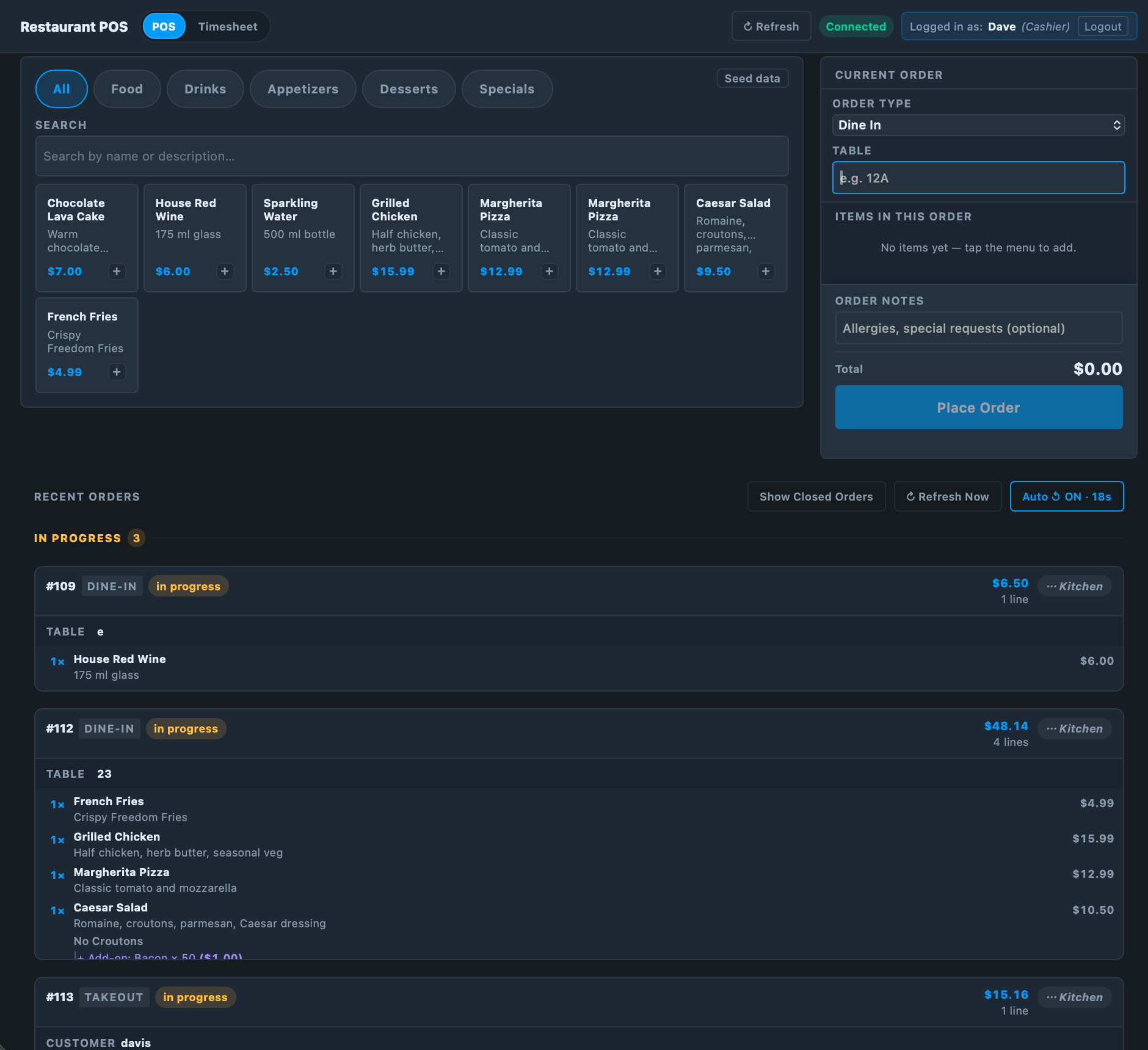
POS — Cashier View
Cashier point of sale view

Cashier Interface

Everything a cashier needs — nothing they don't. Fast to learn, fast to use.
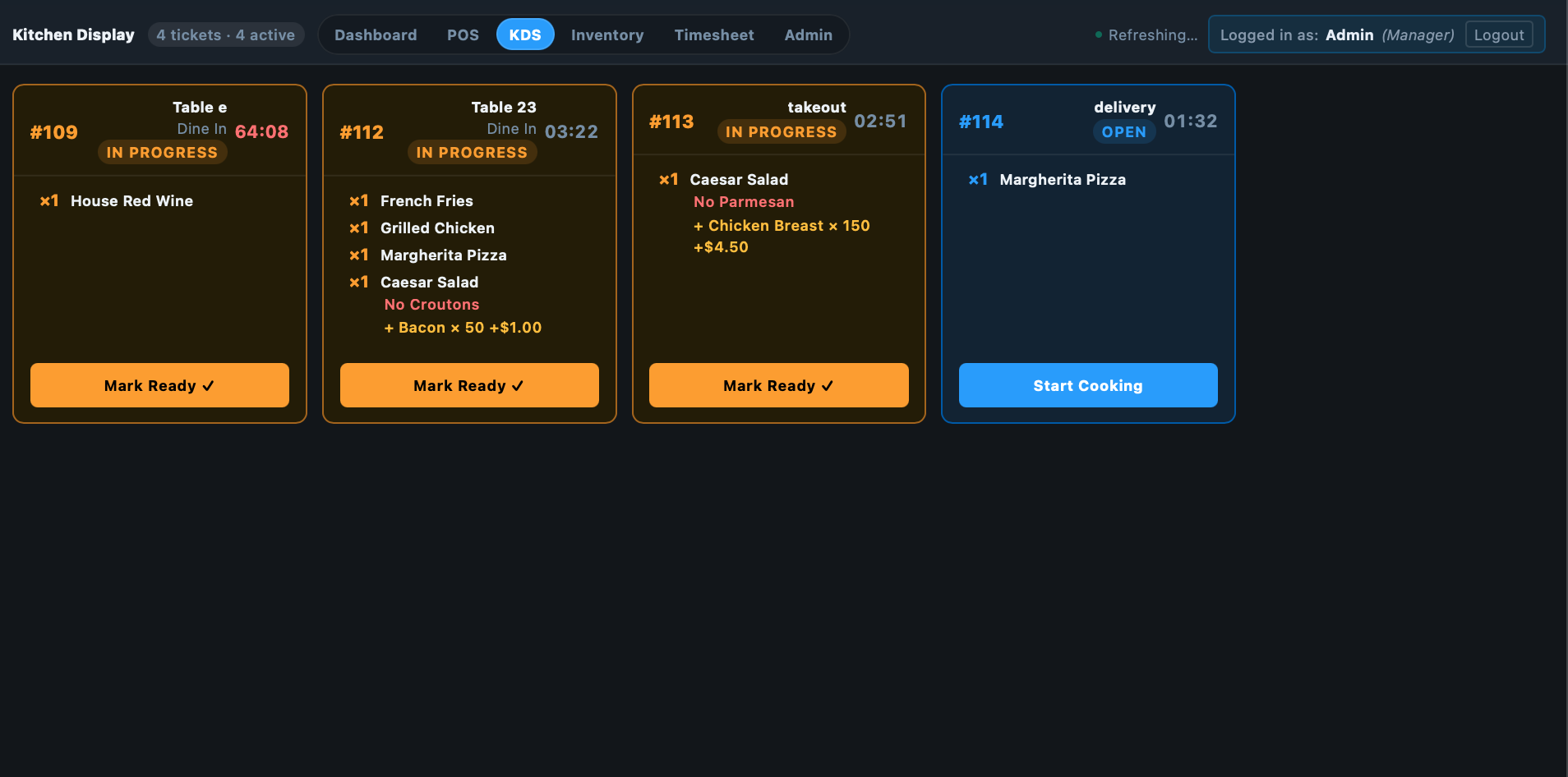
KDS — Kitchen Display
Kitchen display system showing live orders

Kitchen Display System

Live order queue with age timers. No paper tickets — cooks tap to update status.
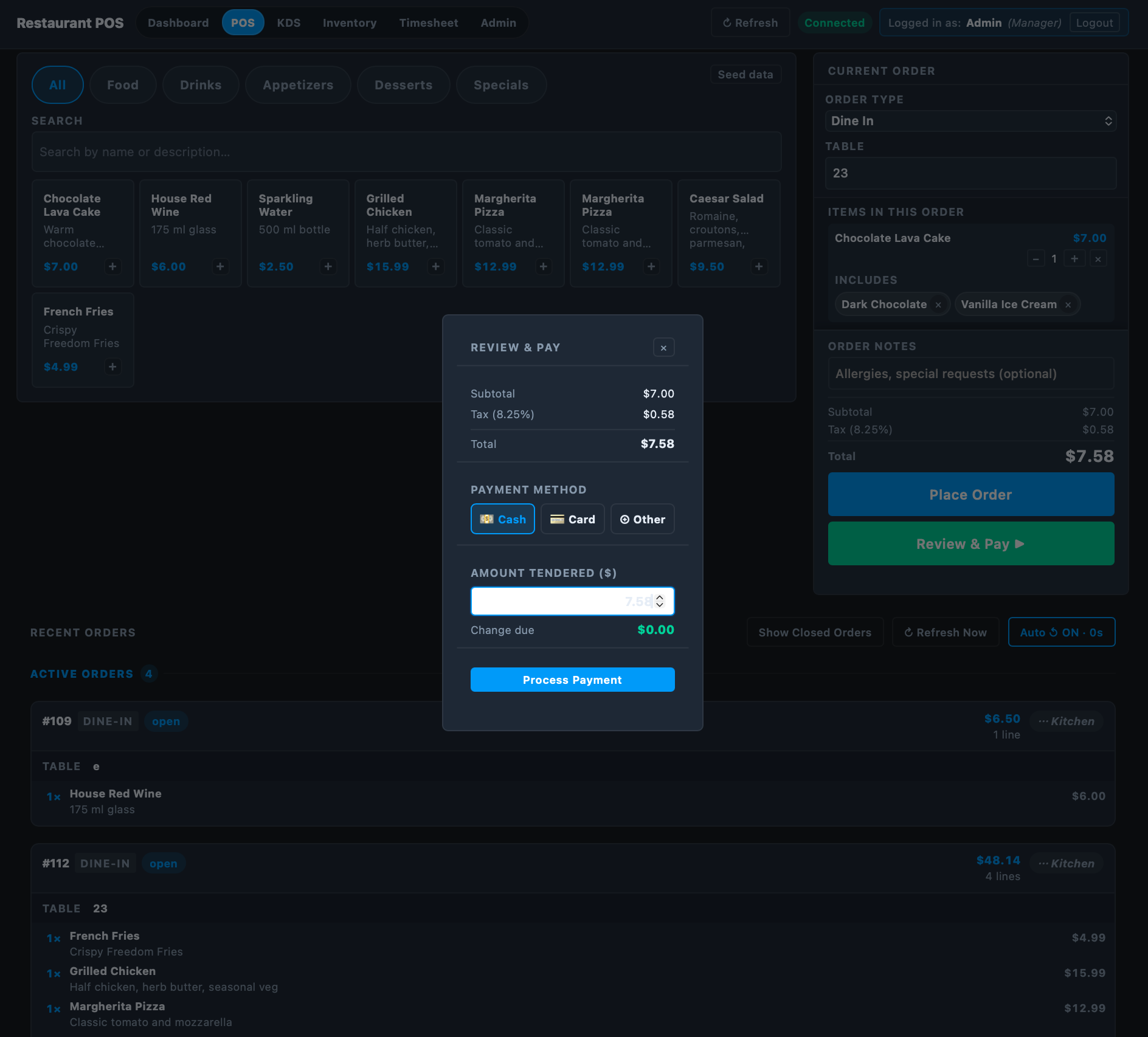
POS — Review & Pay
Payment selection screen — cash and card

Review & Pay

Cash (with change calc) or Square card — clean checkout modal, one tap to close.
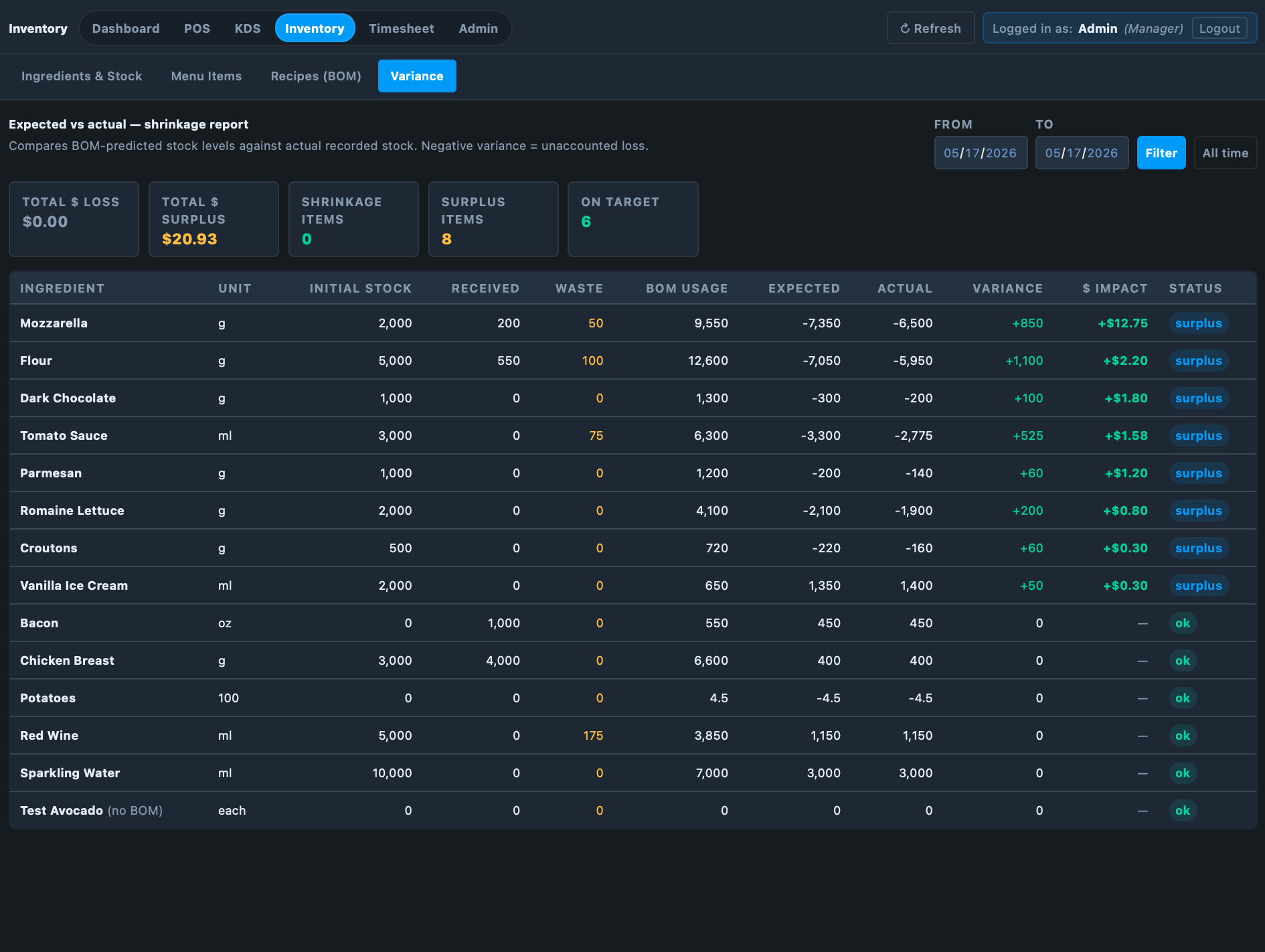
Inventory — Variance Report
Inventory variance and shrinkage report

Inventory Variance & Shrinkage

Expected vs. actual stock with dollar-loss impact. See exactly where product is going.
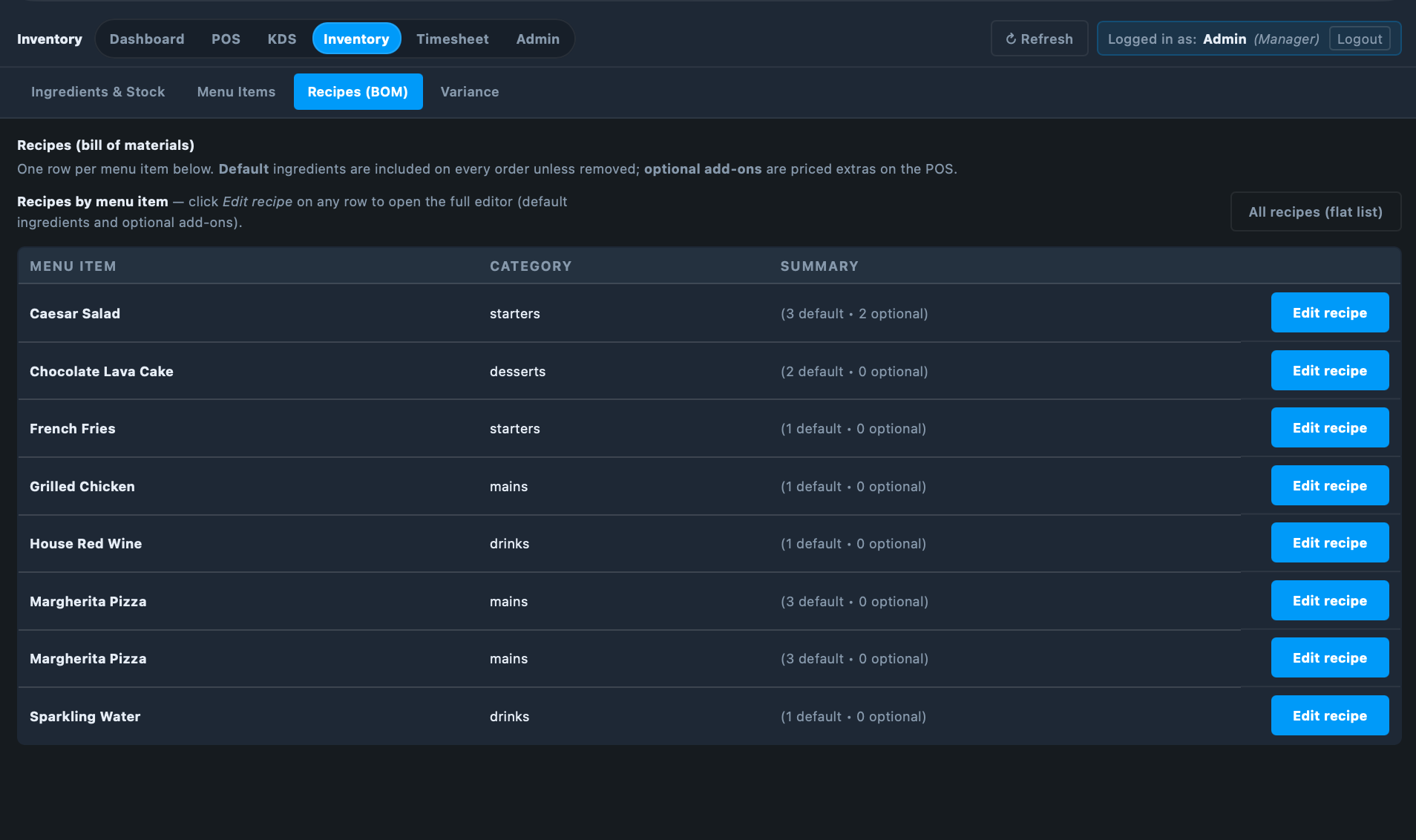
Inventory — Recipe / BOM
Bill of materials recipe editor

Recipe Builder (Bill of Materials)

Link every menu item to exact ingredients and quantities. Stock auto-deducts on each sale.

🛠️

Service & Job Business POS

Jobs — Pipeline View
Service POS job pipeline — quote to invoice

Job Pipeline

Every job moves through Quote → Approved → In Progress → Invoiced. Full job details, notes, and line items in one view.

Jobs — New Job / Checkout
Service POS new job and item selection

New Job & Item Selection

Browse products and services by category, add to a job, attach a customer, set a due date, and create in one tap.

Customers — CRM
Customer CRM with contact info and job history

Customer CRM

Every customer in one searchable list — name, phone, email, address, and full job history always a tap away.

Inventory — Parts & Stock
Parts and materials inventory with reorder alerts

Parts & Materials Inventory

Track every part and material with current stock, reorder points, and cost per unit. Low-stock items flagged automatically.

Reports — Revenue & Labor
Revenue by job status and labor cost report

Revenue & Labor Reports

Revenue by pipeline stage, labor cost as a % of revenue, and top products/services by sales — all in one report.

Dashboard — Manager Overview
Manager dashboard with sales, jobs and alerts

Manager Dashboard

Total revenue, jobs by status, recent activity, low-stock alerts, and quick-action shortcuts — everything at a glance.

Two products, one company

Choose Your POS System

Both systems are self-hosted, offline-capable, and built for the way you actually work — not retrofitted from a generic platform. Pick the one that fits your business.

🍽️
Flagship Product

Restaurant & Café POS

Built from the ground up for food service. Every feature — from the kitchen display to the bill-of-materials inventory — was designed around how restaurants actually operate.

  • Full POS with category menu, order types & table management
  • Kitchen Display System — live queue, age timers, no paper tickets
  • Inventory & Recipe BOM — stock auto-deducts on every sale
  • Employee timesheets with weekly payroll reports & CSV export
  • Square card processing — tap, chip & swipe built in
  • Manager dashboard with prime cost, sales breakdown & low-stock alerts
Best for: restaurants, cafés, diners, food trucks, bars
🛠️
New Product

Service & Retail Business POS

Designed for job-based and service businesses. Manage quotes, track jobs through a pipeline, invoice customers, and keep tabs on inventory and labor — all from one self-hosted system.

  • Job pipeline — quote → approved → in progress → invoiced
  • Customer CRM with contact info, job history & notes
  • Inventory & stock tracking with reorder alerts & variance reports
  • Employee timesheets with weekly scheduling & payroll export
  • QuickBooks CSV export — sales, inventory & labor data
  • Manager dashboard with revenue by status, labor cost & top products
Best for: window & blinds, HVAC, landscaping, auto, repair shops, retail
🔒

Both systems share the same core advantages

Self-hosted on hardware you own  ·  Works offline without internet  ·  $0/month after purchase  ·  Your data stays yours

Own your system

No Cloud. No Subscription.
Just Your Business.

Most POS systems charge $150–$300/month forever. IntuitiveTill runs on a small local computer you own. Pay once, run for years.

🔒

Your Data Stays Yours

All data lives on your hardware. No third party can access, sell, or cut you off from your own records.

📶

Works Without Internet

Runs entirely on your local network. An ISP outage won't shut down your business mid-rush.

💸

No Monthly Fees

Pay once for the software (and optionally Square's per-transaction rate for card processing). That's it.

Blazing Fast

No cloud round-trips. Your system loads from a machine 10 feet away — every tap responds instantly.

IntuitiveTill vs. Traditional Cloud POS

Feature IntuitiveTill Typical Cloud POS
Monthly software fee $0 $150 – $300+
Works without internet ✓ Always ✗ Mostly not
You own your data ✓ 100% Hosted by vendor
Kitchen Display included ✓ Built-in Often add-on $$$
Inventory + BOM tracking ✓ Built-in Premium tier only
Employee timesheets ✓ Built-in Add-on or separate

Don't take our word for it

What Restaurant Owners Say

★★★★★

"We were paying $220/month for our old POS and half the features were locked. IntuitiveTill has everything we need, runs on a $300 mini PC, and hasn't gone down once."

👩
Maria T.
Owner, Café Soleil · Chicago, IL
★★★★★

"The kitchen display system alone was worth it. My cooks stopped missing items and we cut our ticket times by almost 3 minutes on average. The inventory BOM is a game-changer."

👨
James K.
Head Chef & Owner, Kilo Bistro · Austin, TX
★★★★★

"Setup was surprisingly simple. We were live within a day. The manager dashboard gives me the numbers I actually care about — prime cost and where my food is going."

🧑
Sam R.
Owner, The Rustic Fork · Denver, CO

Simple pricing

Transparent, One-Time Pricing

No monthly fees, no subscriptions, no surprises. Choose exactly what you need — or grab the bundle and save $995.

💾

Software, Training & Installation

Full IntuitiveTill license installed and configured on your hardware, plus staff training.

$3,595 one-time
  • All 7 modules included
  • Remote installation & setup
  • Staff training session
  • Lifetime updates, no subscription
🖥️

Hardware Bundle

Everything you need to run the system — pre-configured and ready to plug in.

$2,795 one-time
  • 1 server (mini PC)
  • 1 register computer
  • 1 management computer
  • 2 tablets (POS & KDS)
⭐ MOST POPULAR — BEST VALUE

Complete System Bundle

Software + Hardware Bundle — everything installed, configured, and ready to go.

$5,395 one-time
$6,390 if bought separately Save $995
Software, training & installation ($3,595 value)
Full hardware bundle — server, register, management PC & 2 tablets ($2,795 value)
🔄
OPTIONAL ADD-ON

Full Hot Swap Backup Server

A plug-and-play replacement server kept in sync with your latest backups. If your main server ever fails, swap this one in within minutes and be back online — no data loss, no downtime.

  • Pre-configured spare server
  • Always synced to latest backup
  • Back online in minutes if server fails
$795 one-time Add to Order

💳 Optional card processing via Square — their standard 2.6% + 10¢ per transaction. No markup from us.

Try it yourself

See Both Systems Live — Right Now

Launch either full demo with real sample data already loaded. No account required — just click and explore.

🍽️

Restaurant & Café POS

Try the full POS, fire orders to the kitchen display, check inventory variance, and explore the manager dashboard — all with real sample data.

Login: admin  /  PIN: 1234

Try Restaurant Demo

Opens in a new tab. No account required.

🛠️

Service & Job Business POS

Explore the job pipeline, customer CRM, invoicing, parts inventory, and manager dashboard for service-based businesses — with real sample data.

Demo coming soon — contact us to be notified when it launches.

Try Service Demo

Opens in a new tab. No account required.

Get in touch

Ready to Ditch the
Cloud POS Bill?

Have questions before you commit? Want a live walkthrough for your specific setup? We're happy to schedule a quick call or answer anything by email.

👤 David McFarland
📍 204 Haley Rd
Johnson City, TX 78636
🕒 Response within 1 business day
🛠️ Setup & training: typically same week